
Lights
Gobos
A gobo is a texture projected through a light. Add one to a Point, Spot, Rect or Directional Light to break up flat lighting with window frames, blinds or moving leaves.
How It Works
A gobo uses Unreal's Light Function system, with the material already built. Dark areas of the texture block the light and bright areas let it through.
A gobo only takes light away, so raise Intensity to balance it.
What It Fixes
| The problem | What to do |
|---|---|
| The lighting looks flat. | Add a breakup pattern, such as Soft Breakup. |
| You want sunlight through a window that isn't in the shot. | Add a window or blinds preset. |
| A Light Function Material takes time to build for each look. | Pick a preset in the Details panel. |
| Meshes placed in front of a light are slow to change. | Change Scale, Rotation and Softness instead. |
| The shot feels static. | Add Wind to leaves, Panner to clouds, or Flicker to firelight. |
What's Included
- 33 patterns and 31 presets: windows, stained glass, blinds, foliage, breakups, clouds, water, effects, studio shapes and lamps. A pattern is the texture only. A preset also sets size, softness and motion.
- All four light types: Point, Spot, Rect and Directional Lights, except Static lights.
- Controls: Scale, Rotation, Softness, Opacity, Offset, Contrast and Invert.
- Animation: Wind, Panner, Rotator, Flicker and Water, plus Distortion and Position Sway.
- Color: tint the light from the texture or pick colors yourself. See Colored Gobos.
- Your own: use any texture, and save any look as a preset.
Adding a Gobo
Select the light.
In the Details panel, in the Lighting Suite category, open the Gobo group.
Click the Preset box (1) and choose a preset, such as a window or foliage preset.
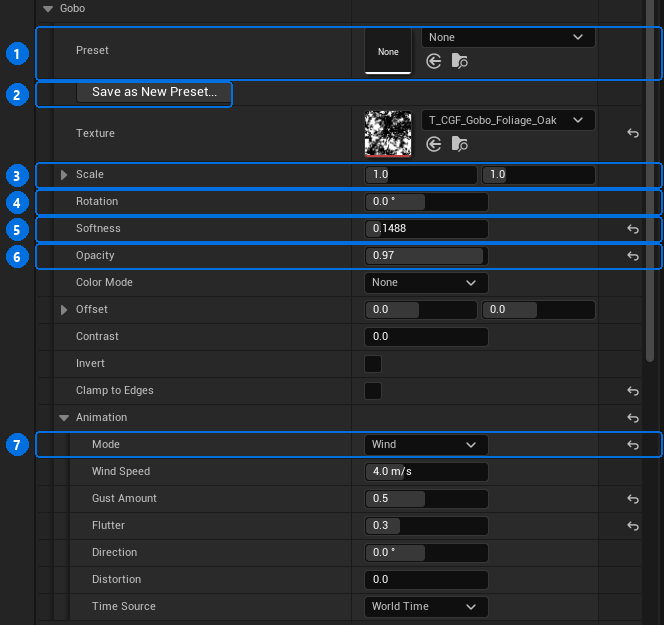
The Gobo group in the Lighting Suite category of a Spot Light, here with the Oak Canopy preset and Wind. 1 Preset. 2 Save as New Preset... 3 Scale. 4 Rotation. 5 Softness. 6 Opacity. 7 Animation Mode. You should see: the pattern in the light on the surfaces it reaches.
Adjust Scale (3), Rotation (4) and Softness (5) while you watch the lit surface.
To let some light through the dark parts, like thin leaves, lower Opacity (6).
To make the pattern move, open Animation and choose a Mode (7), such as Wind.
On a Directional Light, set Gobo Tile Size to the world size of one repeat of the pattern.
To keep the look, click Save as New Preset... (2) under the Preset row.
You can also drag a preset from Presets > Gobos in the Lighting Suite Library onto the light. To use only a pattern, set the Texture row.
To remove the gobo, clear the Texture row. The reset arrow on the Preset row only unlinks the preset and keeps the gobo.
Gobo Properties
| Property | Description |
|---|---|
| Preset | A pattern with its size, softness, color and motion. Picking one copies it onto the light. |
| Texture | The pattern. Empty means no gobo. On a Point Light, the pattern wraps all around the light. |
| Scale | Size of the pattern. Default 1. |
| Rotation | Turns the pattern around the light direction, in degrees. |
| Softness | Softens the pattern's edges, like an out-of-focus gobo. From 0 to 1. Default 0. |
| Opacity | How much the pattern blocks the light. 1 is full, 0 is none. Default 1. |
| Color Mode | None (default, the pattern only blocks light), Texture Color (the texture's colors tint the light) or Channel Colors (you pick a color for the red, green and blue areas). |
| Red, Green, Blue Channel Color | With Channel Colors: the light's color through each area of the mask. |
| Offset | Moves the pattern across the beam. |
| Contrast | Takes the pattern's dim parts down to black. 0 (default) is the pattern as drawn. |
| Invert | Swaps the light and dark areas. |
| Clamp to Edges | On (default): blocks the light outside the pattern instead of repeating it. Point and Directional Lights ignore it. |
| Animation | How the pattern moves. See below. |
| Gobo Tile Size | Directional Lights only: world size of one repeat. Default 1000 cm. |
Animation
| Mode | What it does | Main settings |
|---|---|---|
| None | The pattern is still. | |
| Wind | Leaves and branches sway. | Wind Speed (m/s at the foliage, default 4), Gust Amount, Flutter, Direction |
| Panner | The pattern drifts across the light, like cloud shadows. | Direction, Panner Speed |
| Rotator | The pattern turns, like a ceiling fan. | Rotation Rate (degrees per second) |
| Flicker | The light dips and swells, like fire or a failing lamp. | Flicker Amount, Flicker Speed (Hz), Position Sway |
| Water | Two copies of a pattern drift apart. For the Water & Caustics patterns. | Direction, Panner Speed |
| Property | Description |
|---|---|
| Distortion | Adds a wavy shimmer, like heat haze, with any mode. |
| Time Source | World Time (plays in game and in realtime viewports) or Manual (uses Gobo Time). |
| Gobo Time | With Manual: the animation time. You can key it in Sequencer. |
Note: Position Sway moves the rendered light around its place, so its shadows move like a real fire's. It works on Point, Spot and Rect Lights with dynamic shadows: Movable lights, and Stationary lights when Allow Static Lighting is off in Project Settings. Static lights and Directional Lights never sway.
Colored Gobos
- Point, Spot and Rect Lights show colors when Project Settings > Rendering > Light Function Atlas Format is 8 bits RGB Color. This needs an editor restart. Deferred Lighting Uses Light Function Atlas must also be on, which is Unreal's default.
- Directional Lights show gobo colors in the Path Tracer only.
- Elsewhere the colors show as gray.
The Lighting Suite doesn't change these settings on its own. The Message Log offers them as fixes.
Built-in Gobos
The same Spot Light with two of the built-in presets. Only the gobo changes; the bright floor on the right is the level's own sunlight.
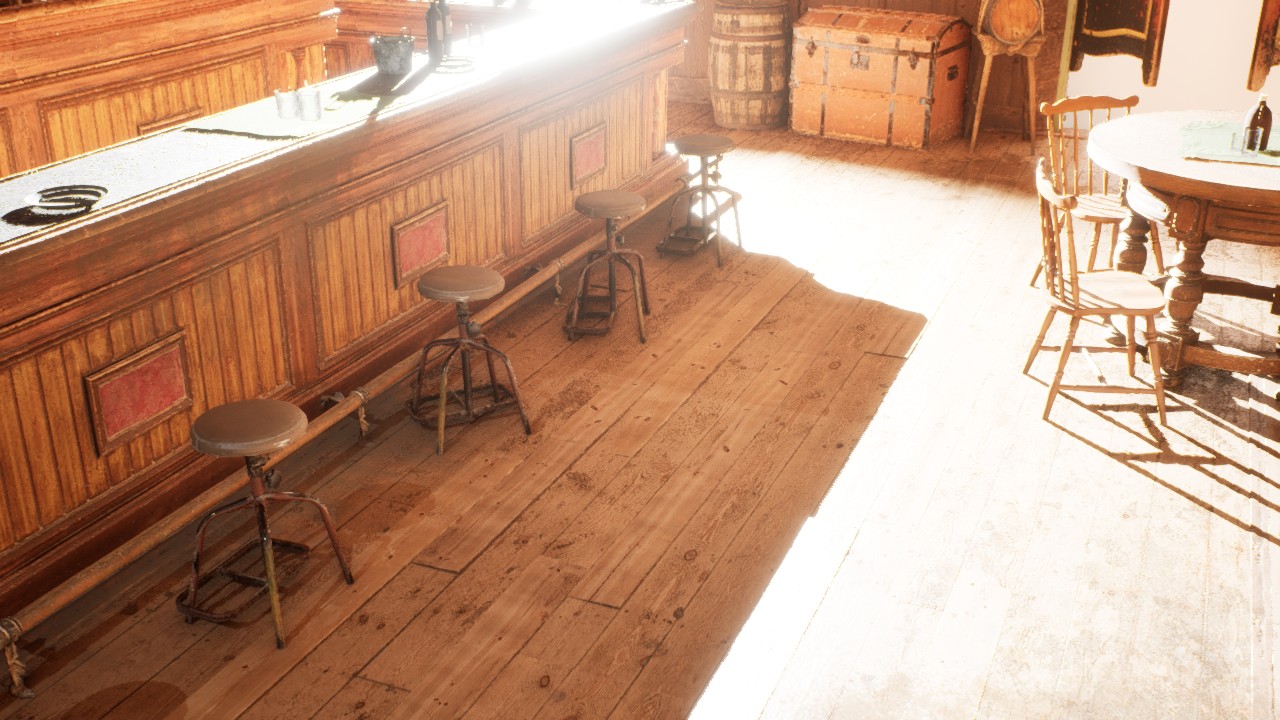
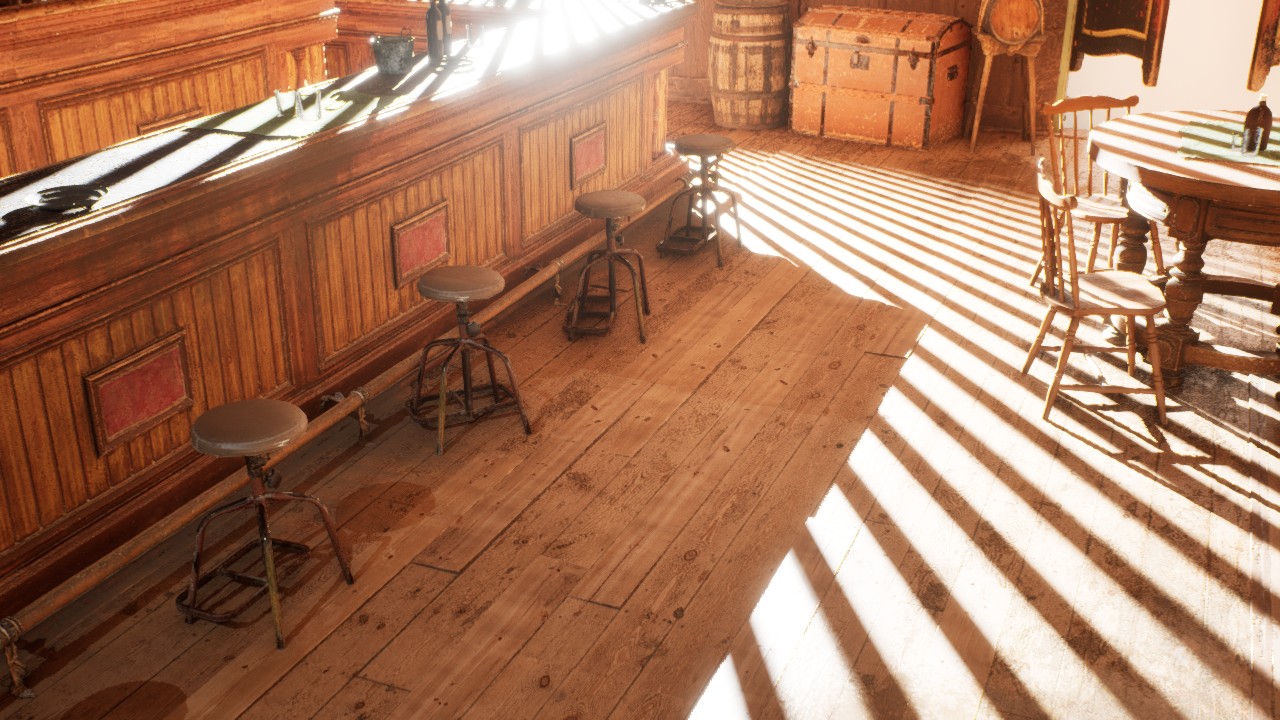
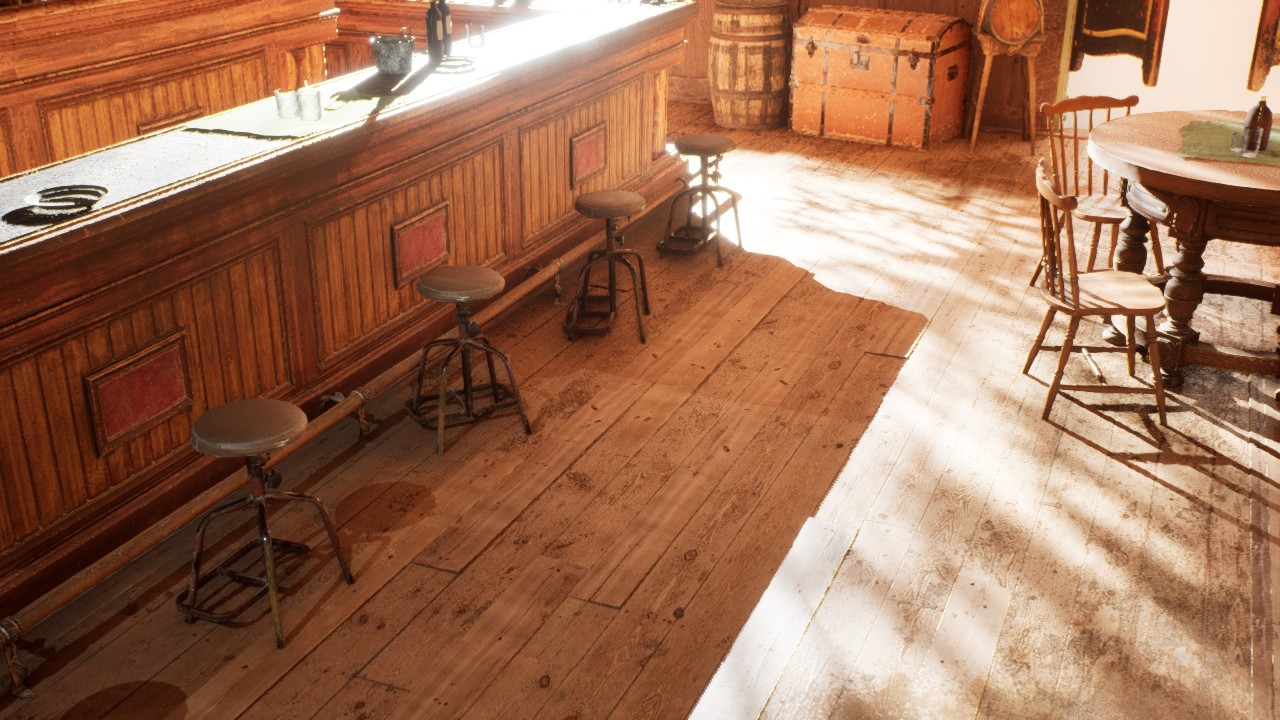
The Library has 33 patterns under Textures > Gobo Patterns and 31 presets under Presets > Gobos.
| Family | Examples |
|---|---|
| Windows | Window, 6 Panes; Arched Window; Rose Window |
| Stained Glass | Stained Glass Window; Three-Color Glass |
| Blinds & Slats | Venetian Blinds; Louvered Shutter; Pergola |
| Foliage | Sparse Leaves; Oak Canopy; Palm Fronds; Sun Dapple |
| Breakups | Soft Breakup; Hard Breakup; Organic Cells |
| Sky & Clouds | Cumulus Shadows; Streaky Clouds; Storm Light |
| Water & Caustics | Pool Caustics; Shallow Sea; Pool Reflection |
| Effects | Firelight; Screen Glow |
| Studio Shapes | Soft Iris; Light Slash |
| Lamps (Point Lights) | Pierced Lantern; Caged Bulb; Star Projector |
Additional Notes
Why does my gobo not show?
Check the Message Log. Common reasons:
| Message | Meaning | Fix offered |
|---|---|---|
| Static light with a gobo | Static lights show no gobo. | Make Stationary |
| Light function atlas full | Too many lights with a Light Function for the atlas. | Raise Light Function Atlas Size |
| Virtual texture gobo | Virtual Textures don't work in Light Functions. | None |
| Gobo texture streams | The texture can stream at a lower resolution. | Keep Full Resolution |
| Light Function Atlas Format is 8 bits Gray Scale | Gobo colors show in gray. | Use 8 bits RGB Color |
| Deferred lighting draws gobos in gray | Deferred Lighting Uses Light Function Atlas is off. | Use Light Function Atlas |
| Low resolution gobo | Fine edges blur on large pools of light. 1024 px or more keeps it crisp. | None |
Limitations
- It can't brighten. A gobo only takes light away. To add moving water light, use Caustics.
- No gobo on Static lights. Their lighting is baked. The Message Log offers Make Stationary.
- Fine patterns can look soft on Point, Spot and Rect Lights. They draw through the Light Function Atlas, at 128 x 128 pixels per slot by default. To sharpen them, raise
r.LightFunctionAtlas.SlotResolutioninDefaultEngine.ini. This uses more GPU memory. - 16 slots by default. Each Point, Spot or Rect Light with a gobo takes one slot, and Directional Lights take none. Past 16, some lights show no gobo. The Message Log offers Raise Light Function Atlas Size, up to 256 slots, which uses more GPU memory.
- Colors need a project setting. See Colored Gobos.
- The Light Function Material row is read only. Your own material comes back when you turn the gobo off.
- No Virtual Textures. A Virtual Texture used as a pattern doesn't show.
- Lumen takes a moment to update. Indirect Lighting can trail slightly behind a moving pattern.
- Position Sway costs shadow time. It redraws the light's shadows every frame.